About TV screen simulation
Spectaculator can simlulate the picture quality of old 1980s televisions on modern LCD displays.
TV Picture Effect |
Meaning |
|---|---|
Scan Lines |
Mimics the scan lines present on old TVs and CRT monitors. This option can be selected in addition to the options below. NOTE: Scan lines are not available if an overlay filter has been enabled. |
Pixel Smoothing |
Smooths the Spectrum's display at high magnifications. Disable if you prefer sharp but blocky pixels. This option can be selected in addition to the options below. |
RGB Monitor |
Best possible picture quality (TV effects are effectively disabled). This is the default setting. |
Scart (RGB) |
Simulates a TV picture obtained by connected a Spectrum to a TV via an RGB scart cable. This is slightly inferior to the RGB Monitor setting. |
Composite Video |
Simulates a TV picture obtained by connected a Spectrum to a TV via a composite video cable. The picture quality is worse than Scart (RGB) but better than Aerial (RF) Input. |
Aerial (RF) Input |
Simulates a TV picture obtained by connected a Spectrum to a TV via an aerial (RF) lead. This was the only method of connecting Spectrums to TVs back in 1982. The picture quality is relatively poor and typical of 1980s TVs. |
Sample TV screen effects Original ZX Spectrum output Aerial (RF) input with scan lines Composite video input with scan lines RGB monitor with scan lines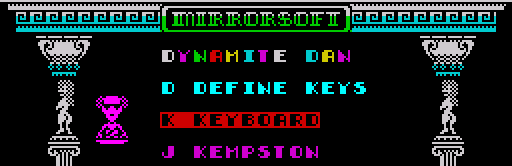
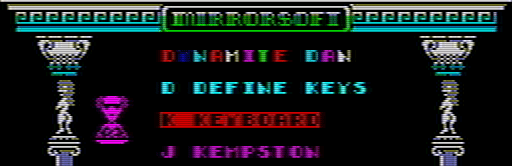
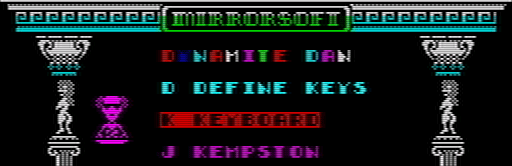
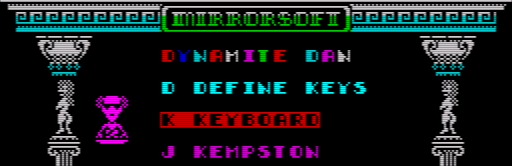
What would you like to to?
Note
If the zoom size for the window is less than 200%, TV screen effects are automatically disabled.
The display will appear slightly darker with Scan Lines enabled.
For best performance on slower computers, use RGB Monitor as this effectively turns off TV picture effects (except scan lines).
A selection of Render plugins and Overlay filters which work with Spectaculator are available to download from here.