About the watch window
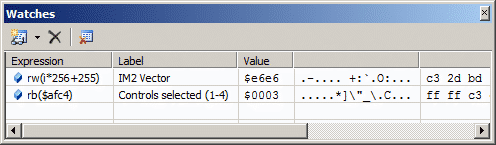
The watch window allows you see the value of variables and expressions while debugging.
The value of the expression is shown along with the ASCII and bytes values of the memory location pointed by the expression value.
The watch window is updated automatically when the program is running. Changed values are highlighted.
Tip
Give watches a label to make it easier to identify them when you have lots of watches.
Switch between hex and decimal easily with Ctrl+H.
Use the rb() and rw() functions to read values from memory.